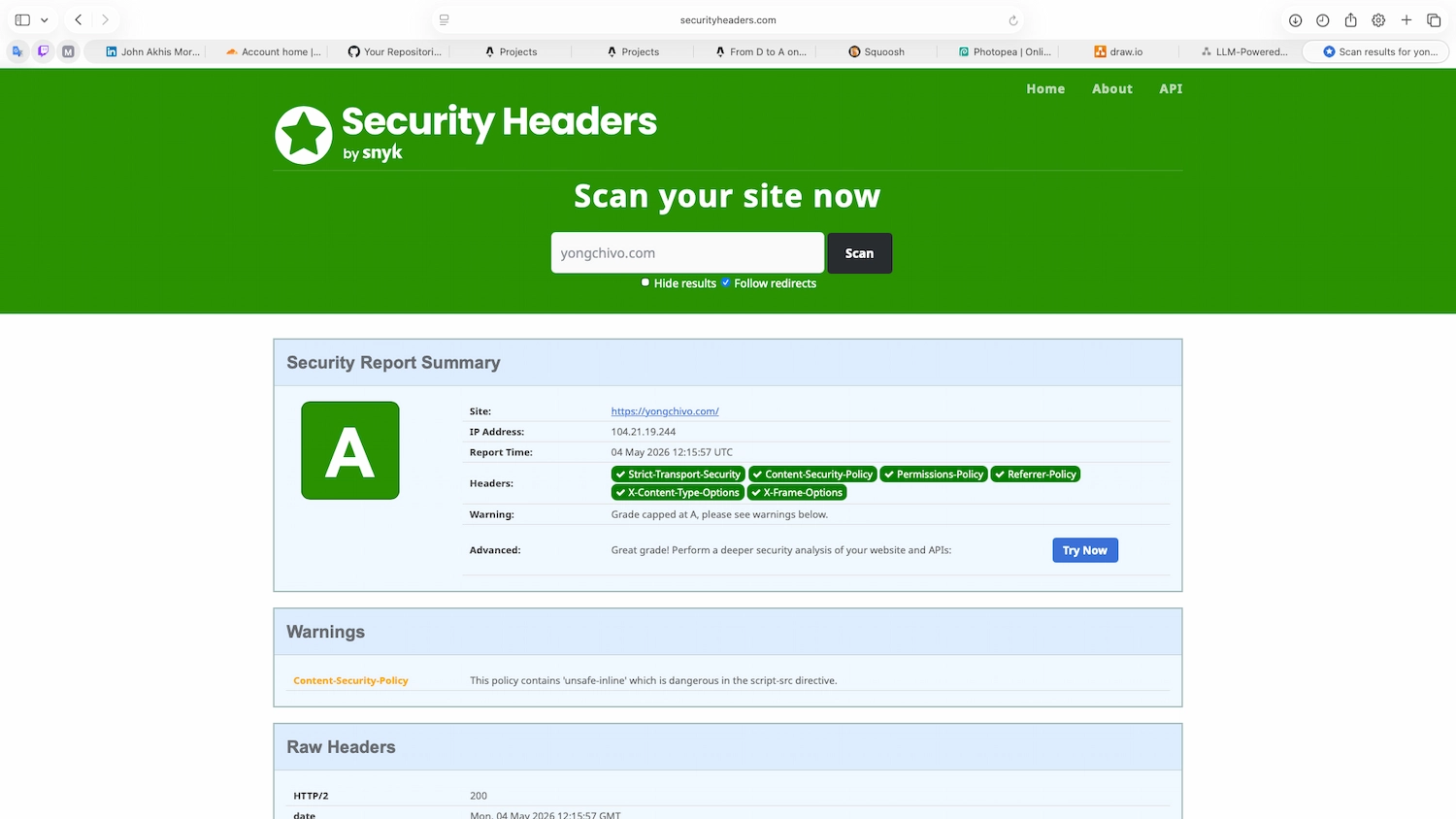
From D to A on securityheaders.com — what each header actually does
This is the first real post on this site. I figured a good way to break the ice was to write about the first proper bit of security work I did on the portfolio itself: taking my HTTP security header score from D to A on securityheaders.com.
If you’ve never run that scan on your own site, do it before reading the rest. It’s free, takes 10 seconds, and the result is usually… humbling.
What I started with
When I first deployed this site to Cloudflare Pages, I scanned yongchivo.com and got a D. Two headers were present (Referrer-Policy and X-Content-Type-Options, both auto-set by Cloudflare). Four were missing:
- Strict-Transport-Security (HSTS)
- Content-Security-Policy (CSP)
- X-Frame-Options
- Permissions-Policy
A D doesn’t mean the site is broken. It means the browser has fewer guardrails when something goes wrong. Headers don’t replace good code — they’re a safety net for when the code is wrong.
How I added the headers
Cloudflare Pages reads a special file called _headers from the public/ folder of an Astro project. The format is simple: a path pattern, then indented headers underneath.
/*
  Strict-Transport-Security: max-age=31536000; includeSubDomains; preload
  X-Frame-Options: DENY
  X-Content-Type-Options: nosniff
  Referrer-Policy: strict-origin-when-cross-origin
  Permissions-Policy: camera=(), microphone=(), geolocation=(), interest-cohort=(), payment=(), usb=()
  Content-Security-Policy: default-src 'self'; script-src 'self' 'unsafe-inline'; style-src 'self' 'unsafe-inline'; img-src 'self' data: https:; font-src 'self' data:; connect-src 'self'; frame-ancestors 'none'; base-uri 'self'; form-action 'self'
The /* at the top is not a comment — it’s a path pattern meaning “every route on the site”. This caught me out for a few minutes because my editor kept underlining it as if I’d opened a JavaScript comment without closing it.
Once that file is committed and pushed, Cloudflare picks it up on the next deploy. No dashboards, no UI, no clicks.
What each header is doing
This is the part that mattered most to me. Pasting six headers from a tutorial doesn’t teach you anything. Knowing what each one is defending against does.
Strict-Transport-Security
Tells the browser: “from now on, only ever connect to this site over HTTPS, even if the user types http:// or clicks an old link.” It defends against downgrade attacks where an attacker on the same network tries to intercept the first plain-HTTP request.
max-age=31536000 is one year in seconds. includeSubDomains extends the rule to anything under yongchivo.com. preload is a request to be added to the browser’s hard-coded HSTS list.
X-Frame-Options
Stops other websites from loading mine inside an <iframe>. The classic attack here is clickjacking: an attacker overlays my site under a transparent layer of their own UI, and a victim thinks they’re clicking one thing when they’re actually clicking something on my page.
DENY is the strict version: nobody can frame my site, not even me.
X-Content-Type-Options
nosniff stops the browser from “guessing” the type of a file based on its contents instead of trusting the Content-Type header. Without this, an attacker who can upload a file disguised as an image but containing JavaScript can sometimes get the browser to execute it.
This was already set by Cloudflare, but it’s worth knowing it exists.
Referrer-Policy
Controls how much information leaks when a user clicks a link from my site to somewhere else. With strict-origin-when-cross-origin, external sites only see that the visitor came from yongchivo.com, not which specific page they were on.
Small thing, but a good privacy default.
Permissions-Policy
A list of browser APIs that I’m explicitly disabling: camera, microphone, geolocation, FLoC tracking, payment, USB. My portfolio doesn’t need any of them, so any script that tries to use them — including a compromised third-party dependency — gets blocked at the browser level.
Content-Security-Policy
This is the big one. CSP defines a whitelist of sources the browser is allowed to load resources from. It’s the main defence against XSS, because even if an attacker manages to inject a <script src="evil.com/x.js">, the browser refuses to load it.
My current policy is roughly: “default to same-origin only, allow inline scripts and styles, allow images from any HTTPS source, and don’t let me be embedded in a frame.”
The 'unsafe-inline' parts are the compromise. Astrofy uses inline scripts and styles for a few features, and removing them would break the site. The fix is to use nonces or hashes, but that requires more refactoring than I wanted to take on for the first pass.
What I learned
A few things stuck with me after this:
Headers are easy to add and easy to break. Adding HSTS with preload is essentially a one-way decision — once browsers cache it, you can’t quickly revert. Worth understanding before pasting.
CSP fights you the first time, every time. A strict CSP will silently break things in your site if you don’t know what’s loading where. Browser DevTools (Console tab) is your best friend — every blocked resource is logged there.
The grade is a starting point, not a goal. A on securityheaders.com is good. A+ requires removing 'unsafe-inline' from CSP, which is a real piece of work. For a static portfolio with no user accounts and no sensitive data, A is the sensible target.
You learn more by doing than by reading. Every headline I’d read about security headers made sense after I’d actually had to deploy and debug them. Reading isn’t the same as building.
Where I go from here
A few things on the list:
- Removing
'unsafe-inline'to push from A to A+ — this is the next interesting piece of work, and it’s worth a follow-up post. - Adding Cross-Origin-Opener-Policy and Cross-Origin-Embedder-Policy for the upcoming headers section.
- Documenting the Content-Security-Policy in the repo so future-me remembers why it looks like that.
If you’re a student running your own site, do the scan. The default modern web stack — even something as polished as Astro on Cloudflare Pages — leaves you sitting at a D until you opt in to the headers. Worth knowing.
This post is part of “learning in public” — me documenting things I figure out as I go through my Cyber Security degree at Worcester. If you spot something I got wrong, please tell me. That’s the whole point.
Comments
Sign in with GitHub to leave a comment or react. Be kind, be useful.